Optimizing a Management Debian Image for Faster KYPO "man" Node Deployments on OpenStack
Thursday 22 January 2026 Ahmed Bokri 2920 views
Optimizing a Management Debian Image for Faster KYPO “man” Node Deployments on OpenStack
Resource consumption per KYPO sandbox (man node impact)

In KYPO, each sandbox typically includes a dedicated “man” node plus additional instances (Windows/Linux machines, attacker VM, etc.). When we deploy N sandboxes in parallel in a pool, the total infrastructure cost grows quickly. The man node image size directly affects:
- image upload and distribution time.
- Glance / backend storage usage
- Scheduling constraints (flavor disk must be >= image min-disk)
- overall time to bring all sandboxes up
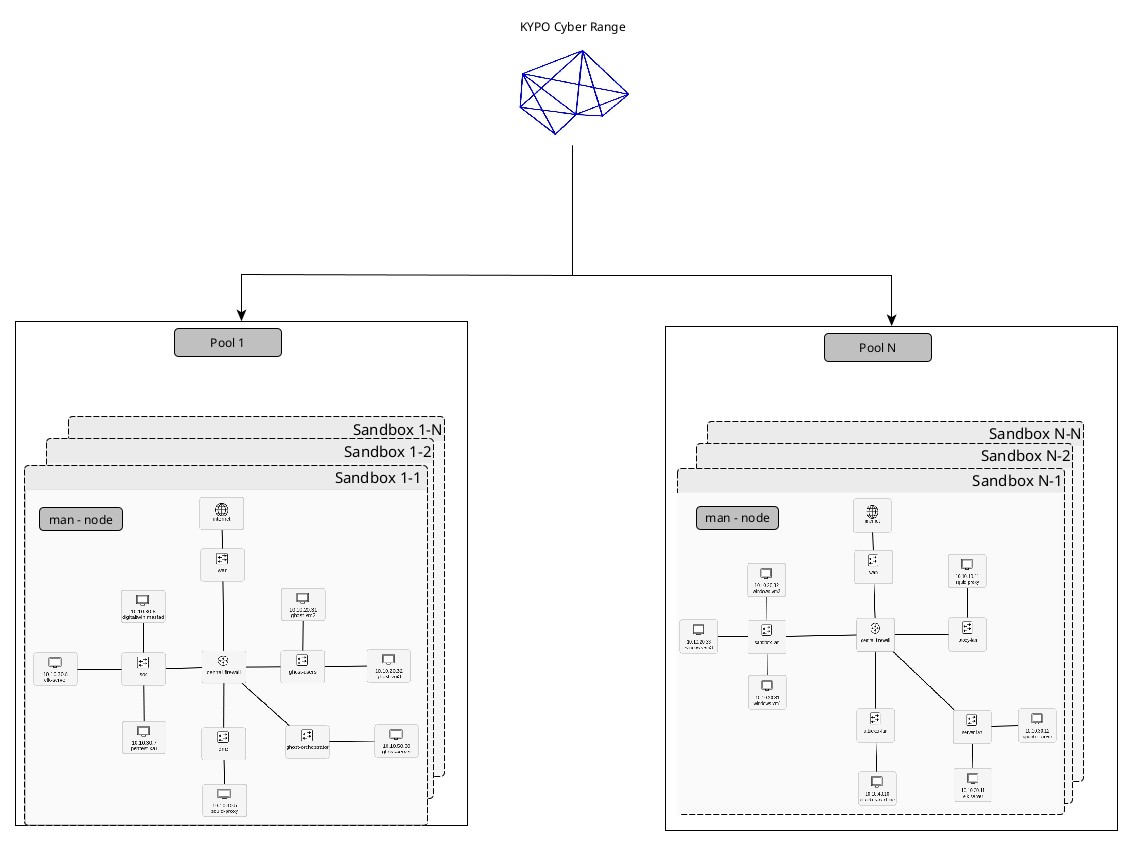
In a typical KYPO deployment, this image is uploaded to OpenStack (often via Terraform during KYPO installation) and then reused for each sandbox deployment. Identical sandbox instances are grouped into a “pool”.
Per-sandbox storage footprint (man node)
There are two different “sizes” to consider:
- Image virtual size (min disk requirement)
- This is what OpenStack uses to validate a flavor disk size (min-disk).
- If the flavor disk is smaller than this value, instance build fails.
- Image real size (storage / transfer)
- This is what consumes space in Glance and what you actually transfer and store.
- This affects deployment speed and storage pressure. This is why the idea was to optimize the man image size to reduce effectively disk usage especially when deploying multiple sandboxes simultaneously.
Prerequisites
-
Host OS: Debian or Ubuntu
-
Install required tools:
sudo apt update
sudo apt install -y qemu-utils kpartx parted e2fsprogs
We need an existing RAW image : In this case I am dealing a with Debian image after provisionning it with Packer to be KYPO and OpenStack compatible (SSH , Winrm, Cloudbase init etc…).
Attach and map the image
This attaches the RAW file to a loop device and exposes its partitions through /dev/mapper.
sudo losetup --show -Pf debian.raw
# Example output: /dev/loop45

sudo kpartx -av /dev/loop45
# Example mapping: /dev/mapper/loop45p1
Mount the main partition:
sudo mkdir -p /mnt/debian-clean
sudo mount /dev/mapper/loop45p1 /mnt/debian-clean
Clean the filesystem
This step removes caches and reduces logs to free space without breaking boot.
sudo rm -rf /mnt/debian-clean/var/cache/apt/archives/*
sudo find /mnt/debian-clean/var/log -type f -exec truncate -s 0 {} \;
sudo rm -f /mnt/debian-clean/etc/machine-id

sudo journalctl --directory=/mnt/debian-clean/var/log/journal --rotate || true
sudo journalctl --directory=/mnt/debian-clean/var/log/journal --vacuum-time=1s || true
Zero-fill free space (improves qcow2 compression)
This writes zeros into free space so qemu-img convert -c compresses much better. The “No space left on device” error is expected.
sudo dd if=/dev/zero of=/mnt/debian-clean/zero.fill bs=1M status=progress || true
sudo rm -f /mnt/debian-clean/zero.fill
sudo sync
Unmount before resizing:
sudo umount /mnt/debian-clean
Shrink the filesystem (ext4)
Check consistency, get minimum size, then shrink to a safe target (example: 6G).
sudo e2fsck -f /dev/mapper/loop45p1
sudo resize2fs -P /dev/mapper/loop45p1
sudo resize2fs /dev/mapper/loop45p1 6G
Shrink the partition
After shrinking the filesystem, shrink the partition itself:
sudo parted /dev/loop45
(parted) resizepart 1 6GB
(parted) quit
Optional but recommended: print partition end in bytes (useful for truncating the RAW precisely):
sudo parted /dev/loop45 unit B print
Truncate the RAW file (reduce virtual size)
After shrinking the partition, truncate the RAW file to the new end of the partition (end + 1 byte):
sudo parted /dev/loop45 unit B print
# Suppose partition 1 ends at 6442450943B, then:
sudo truncate -s 6442450944 debian.raw

## Detach cleanly
```bash
sudo kpartx -d /dev/loop45
sudo losetup -d /dev/loop45
Convert to compressed qcow2
qemu-img convert -c -O qcow2 debian.raw debian-12-man.qcow2
qemu-img info debian-12-man.qcow2
Result (measured from our run)
Final image: debian-12-man.qcow2
File: debian-12-man.qcow2
- File size (on disk): ~1.2 GiB
- Format: qcow2
- Virtual size (OpenStack min disk reference): 6 GiB (6442450944 bytes)
- Real allocated size (Glance/storage/transfer): 1.16 GiB (1246738432 bytes)
- Compression: zlib (qemu-img convert -c)
- qcow2 compat: 1.1
- Cluster size: 65536
This image requires only 6 GiB of flavor disk (virtual size), while consuming only ~1.16 GiB in Glance/storage and during transfers (real allocated size). This reduces both scheduling failures (flavor disk too small) and pool-wide storage pressure when deploying many KYPO sandboxes in parallel.
Benefits:
-
faster KYPO sandbox deployments (man node boots and provisions faster)
-
reduced storage and bandwidth usage (Glance + network transfer)
-
compatible with OpenStack and QEMU
-
coud-init friendly (if cloud-init is installed in the image)
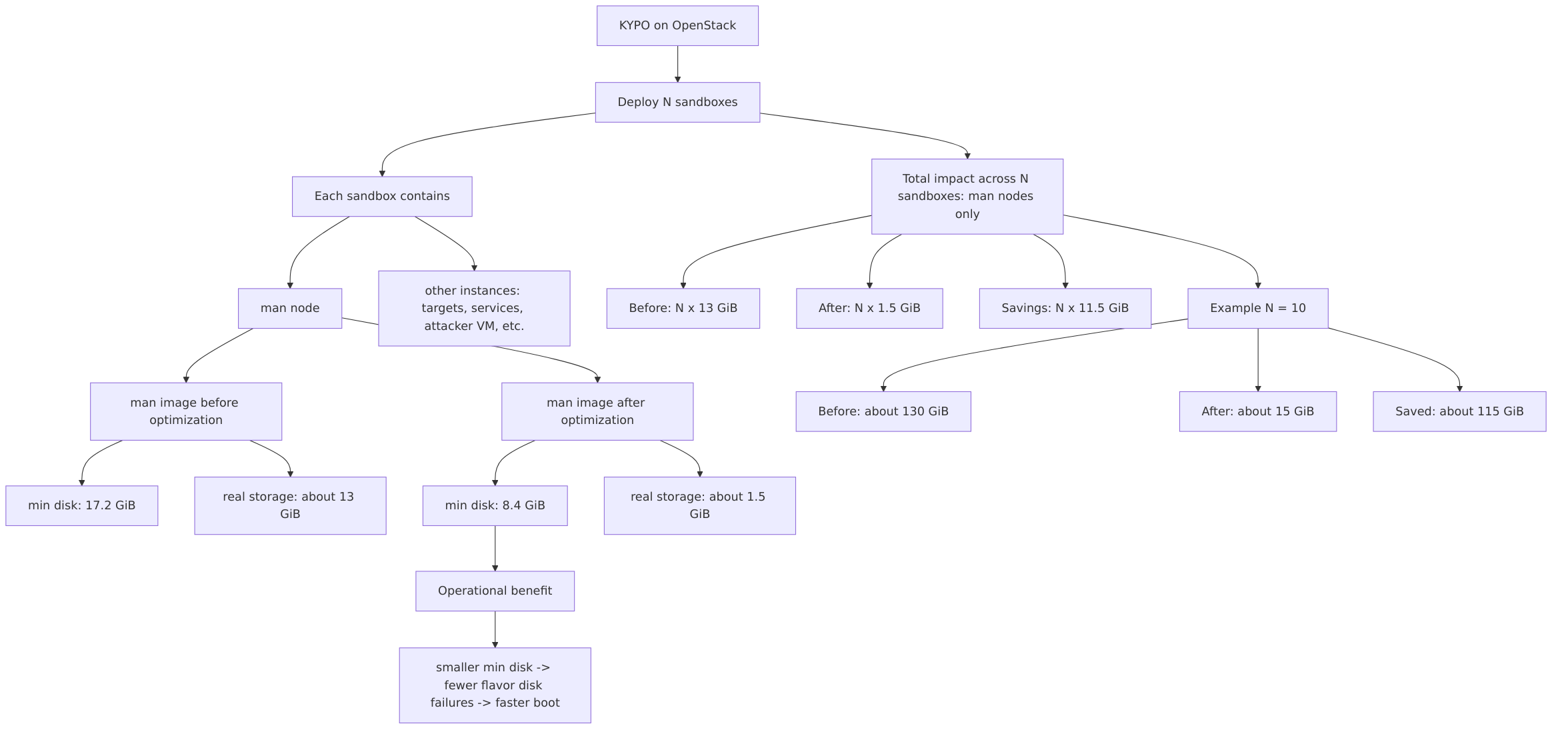
Original image (RAW: debian)
Virtual size (min disk): 16 GiB
Real size (file / transfer): 15.9 GiB (RAW is fully allocated, so it is expensive to store and move)
Optimized image (QCOW2: debian-12-man.qcow2)
Virtual size (min disk): 6 GiB
Real size (Glance/storage/transfer): ~1.16 GiB
Compression: qcow2 + zlib (created with qemu-img convert -c)
What this means when deploying N sandboxes
For N = 10 sandboxes:
Before: 10 * 15.9 = ~159 GiB
After: 10 * 1.16 = ~11.6 GiB
Saved: ~147.4 GiB
In addition, the smaller virtual size (16 GiB -> 6 GiB) reduces failures due to flavor disk constraints and allows smaller disk flavors for the man node.
Important note (instances besides the man node)
Even if the man node is optimized, the total sandbox cost is:
- Total CPU/RAM per sandbox = sum of all flavors for all sandbox instances
- Total storage per sandbox = man node + all other node disks/volumes
So optimizing the man image is a high-impact baseline improvement, especially when N sandboxes are deployed and each sandbox contains multiple instances.
Optimization summary (measured from our run)
| Metric | Before (RAW debian.raw) |
After (QCOW2 debian-12-man.qcow2) |
|---|---|---|
| Virtual size (min disk) | 16 GiB | 6 GiB |
| Real size (file / Glance storage / transfer) | 15.9 GiB | 1.16 GiB |
| Virtual size reduction | - | 10 GiB (62.5%) |
| Real size reduction | - | 14.74 GiB (~92.7%) |
Note:
The “real size” numbers above are taken from qemu-img info (disk size) and match the observed file sizes on disk.
RAW images are typically fully allocated, so they cost much more in storage and transfer than compressed qcow2 images.
This blog post is licensed under
CC BY-SA 4.0


- Resource consumption per KYPO sandbox (man node impact)
- Prerequisites
- Attach and map the image
- Clean the filesystem
- Zero-fill free space (improves qcow2 compression)
- Shrink the filesystem (ext4)
- Truncate the RAW file (reduce virtual size)
- Convert to compressed qcow2
- Result (measured from our run)
- Optimization summary (measured from our run)