Unveiling hashes with Name-That-Hash
Monday 29 June 2026 Thibault Debatty 1106 views
https://cylab.be/blog/512/unveiling-hashes-with-name-that-hash
In the world of cybersecurity, understanding and identifying hash types is a crucial skill. This allows for example to run cracking tools like hashcat or John-the-Ripper with the proper parameters. In this blog post I’ll introduce a handy tool called name-that-hash that simplifies this process. This open-source tool helps you identify the type of a hash and even suggests the appropriate mode for cracking tools like Hashcat and John-the-Ripper.
Easiest way to install name-that-hash is by using pipx:
pipx install name-that-hash
You can find more info about pipx in our other blog post Pip, pipx, pipenv … what the pip?
Now you can use Name-That-Hash with `nth –text ‘’.
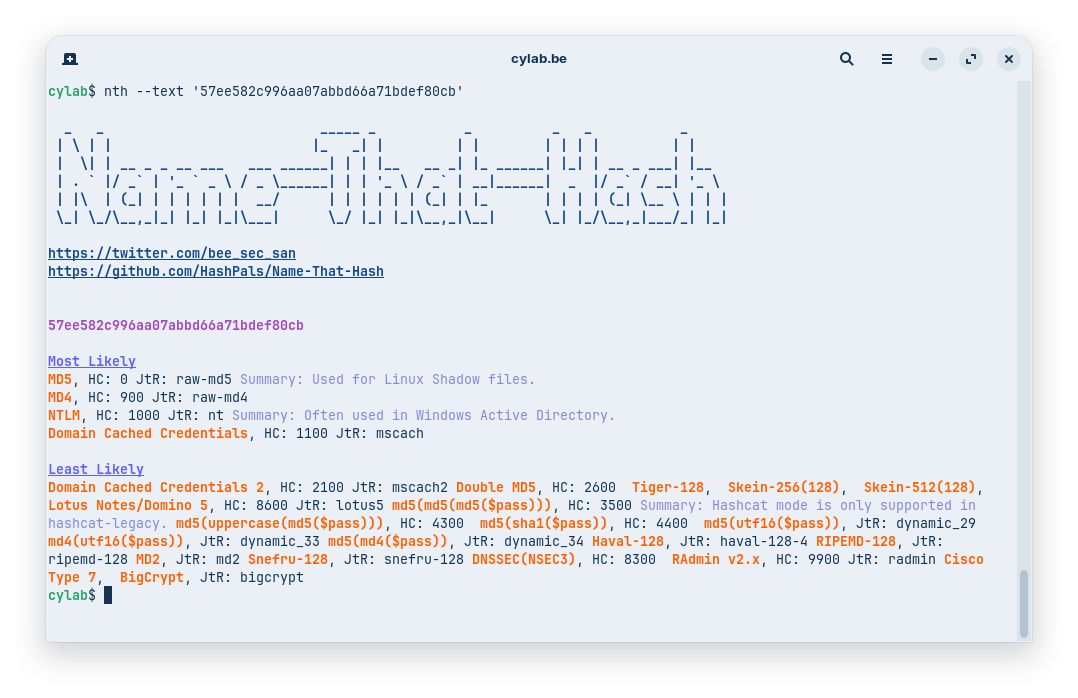
The nice addition is that name-that-hash also shows the mode that must be used with cracking tools hashcat and John-the-Ripper.
Which means you can now try to crack the hash with something like
hashcat -a 3 -m 0 57ee582c996aa07abbd66a71bdef80cb 10k-most-common.txt
Where -a 3 allows to select the brute-force attack mode.
In conclusion, name-that-hash is an invaluable tool for anyone working in cybersecurity, particularly those involved in password cracking and hash analysis. Its simplicity and effectiveness in identifying hash types and suggesting appropriate cracking modes make it a must-have in your toolkit.
This blog post is licensed under
CC BY-SA 4.0


