Quick and Easy Table Filtering with Vanilla JavaScript
Wednesday 8 July 2026 Thibault Debatty 3918 views
https://cylab.be/blog/513/quick-and-easy-table-filtering-with-vanilla-javascript
In this blog post, we propose a simple and effective way to add filtering functionality to your HTML tables using pure javascript. This technique allows users to quickly search and filter table content by typing in a search box, making it easier to navigate and find specific data.
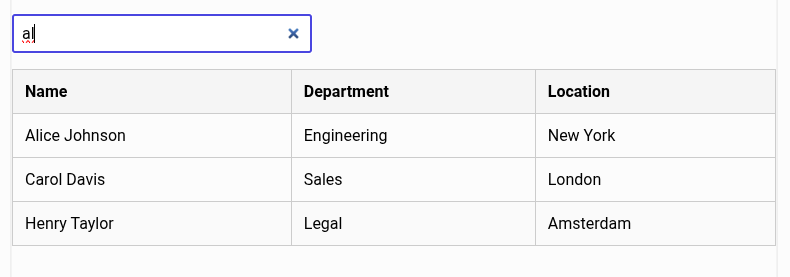
Unlike existing filter plugins, the code below is extremely simple and has no dependency.
HTML
First, let’s add a search box and a table to our HTML:
<input type="search" id="filter-input"
  placeholder="Filter ..." autofocus>

<table id="filter-table">
  <!-- your rows come here... -->
</table>
JavaScript
Next, let’s add the JavaScript to filter the table:
<!-- filterable tables -->
<script>
document.addEventListener("DOMContentLoaded", function () {
    const filterInput = document.getElementById("filter-input");
    const rows = document.querySelectorAll("#filter-table tr");

    function filterTable() {
        const value = filterInput.value.toLowerCase();

        rows.forEach(function (row) {
            const visible = row.textContent.toLowerCase().includes(value);
            row.style.display = visible ? "" : "none";
        });
    }

    filterInput.addEventListener("keyup", filterTable);

    # when the user clicks the "x" button in the search field
    filterInput.addEventListener("search", filterTable);
});
</script>
Compatibility and performance
This solution is compatible with all modern browsers, including Chrome, Firefox, Safari, and Edge. It also works with Internet Explorer 11, but you may need to add some polyfills for older browsers.
This code is efficient for small to medium-sized tables. However, for large tables you may want to consider a more advanced solution that only filters the visible rows or uses a virtual scroll.
This blog post is licensed under
CC BY-SA 4.0


